

Why precision vs accuracy matters (and why the DC GI robot example still teaches us)
Imagine a busy warehouse in 2026. A brand new dc gi robot, a kind of humanoid robot, is tasked with sorting small parts.

Its job is to pick up a blue block and place it into a blue bin. The robot moves its arm, guided by its robot servo motors, and goes for the block. But oops! It keeps putting the blue block just next to the blue bin, every single time. It’s consistently missing the target by the same small amount.
This small mistake might seem simple, but it teaches us a big lesson about "precision" versus "accuracy." In computer robotics and many other fields, people often get these two ideas mixed up. This confusion can lead to many problems when building, testing, or using systems like our sorting robotics example. When we don’t understand the difference, we can make the same mistakes over and over again. This can waste time and money, and even make machines not work as they should.
So, what’s the real difference? Simply put, accuracy is about getting close to the right answer or target. Precision is about getting the same result again and again, even if that result is not the right one.
Our dc gi robot was very precise because it consistently missed the bin in the same spot, but it wasn’t accurate because it didn’t hit the bin itself. As explained by Ossila, accuracy is how close a measurement is to the true value, while precision is how often you get the same measurement repeatedly when you try again and again Accuracy vs Precision: What is the Difference?.

For a deeper dive into this specific robot’s performance, you might want to read more about the Precision vs Accuracy in Robotics: The DC GI Robot Missed Its Target.
This article will help you understand these key differences clearly. We’ll look at common ways things go wrong, how to test for both, and even give you a simple checklist. You can use these tips for robots, AI systems, or any time you need things to be just right. Remember, even with the smartest machines, human wisdom is still important. After all, Verify Before You Trust.
How precision and accuracy differ: core definitions for robotics
Let’s dig a little deeper into precision and accuracy, especially how these ideas work for robots. Think about our dc gi robot again. It was trying to sort blue blocks.
What is accuracy in robotics?
Accuracy in computer robotics means how close a robot gets to its true or correct goal. For our dc gi robot, accuracy would be putting the blue block right into the blue bin. If the robot consistently places the blocks in the bin, it’s accurate. If it keeps missing the bin, even if it always misses in the same spot, it’s not accurate. An accurate robot correctly hits its target. This is about being "right." As noted by Six Sigma DSI, accuracy is about how close a measurement is to the true value Key Differences Between Precision and Accuracy – with Examples.
What is precision in robotics?
Precision in computer robotics means how repeatable a robot’s actions are. If a robot does the same thing over and over again, even if that "thing" is wrong, it is precise. Our dc gi robot was precise because it always missed the blue bin by the exact same amount and in the exact same spot. Its robot servo motors moved in a very consistent way, leading to the same outcome every time. This is about being "consistent." So, a robot can be precise without being accurate. For a clear visual, imagine a dartboard. Hitting the same spot on the board every time, even if it’s not the bullseye, shows precision. If you want to see this idea with a dartboard, there’s a helpful video about Accuracy and Precision Target Diagrams.
Why the confusion matters for robot design and evaluation
It’s easy to get these two mixed up. People often think if something is precise, it must also be accurate. But that’s not true, as our dc gi robot showed us. This mix-up can cause real problems when we design and test humanoid robot or sorting robotics systems.
For example, if a robot arm is designed to pick up items, its robot servo motors might be very precise. They move the arm to the exact same spot repeatedly. But if that spot is slightly off from where the item actually is, the robot will keep failing to pick it up, precisely. We would need to adjust the robot’s "aim" to make it accurate. Without understanding the difference, engineers might spend time trying to make the robot’s movements more consistent (precision) when the real problem is that its target calculation is wrong (accuracy).
This matters a lot in creating good computer robotics. If you are building a new dc gi robot, you need to make sure it not only does the same thing every time (precision) but also does the right thing every time (accuracy). Both are super important for a robot to work well and safely. Understanding these differences helps us troubleshoot better, save money, and build robots that truly perform their jobs. When working with complex data and systems like these, it’s helpful to understand the underlying methods. You can learn more about how data methodologies help ensure quality by reading the peer white paper CRISP-DM and Skylab USA, documenting the data methodology behind permission-based capture.
When our dc gi robot kept missing the blue bin, it showed us how important it is to understand the difference between precision and accuracy. Now, let’s look at what happens when a robot like this sorting robotics system doesn’t work right. It’s like a detective story to find out why.
What to look for when a robot misses its target
When a robot fails, we need a clear way to understand what happened. This is like putting together a puzzle. Experts call this "robotic failure analysis," which means looking closely at problems to fix them and make robots better, as discussed by Vaia’s guide on Robotic Failure Analysis: Causes & Techniques.
Here are the steps to figure out why a dc gi robot might miss its target:
- Problem Statement: First, clearly say what went wrong. For our
dc gi robot, the problem was "the robot consistently placed blue blocks next to the blue bin, instead of inside it." - Observed Outcome: Describe exactly what you saw. The
dc gi robotalways put the block in the same wrong spot, about an inch to the left of the bin’s edge. This tells us about its precision, but not its accuracy. - Measurement Context: What tools did you use to check the robot’s work? Did you use rulers, special cameras, or other sensors? How often did the robot fail? Was it every time, or just sometimes? This helps us understand the conditions of the failure.
- Post-Hoc Analysis Steps: This is when you dig deeper after the problem happens. You check the robot’s settings, its parts, and how it was told to do the job.
Common reasons a robot might miss
Many things can make a computer robotics system like our dc gi robot miss its target. It’s not always simple to find the cause, as shown in a helpful video about 9 Difficult to debug problems in robotics.
Here are some common problems:
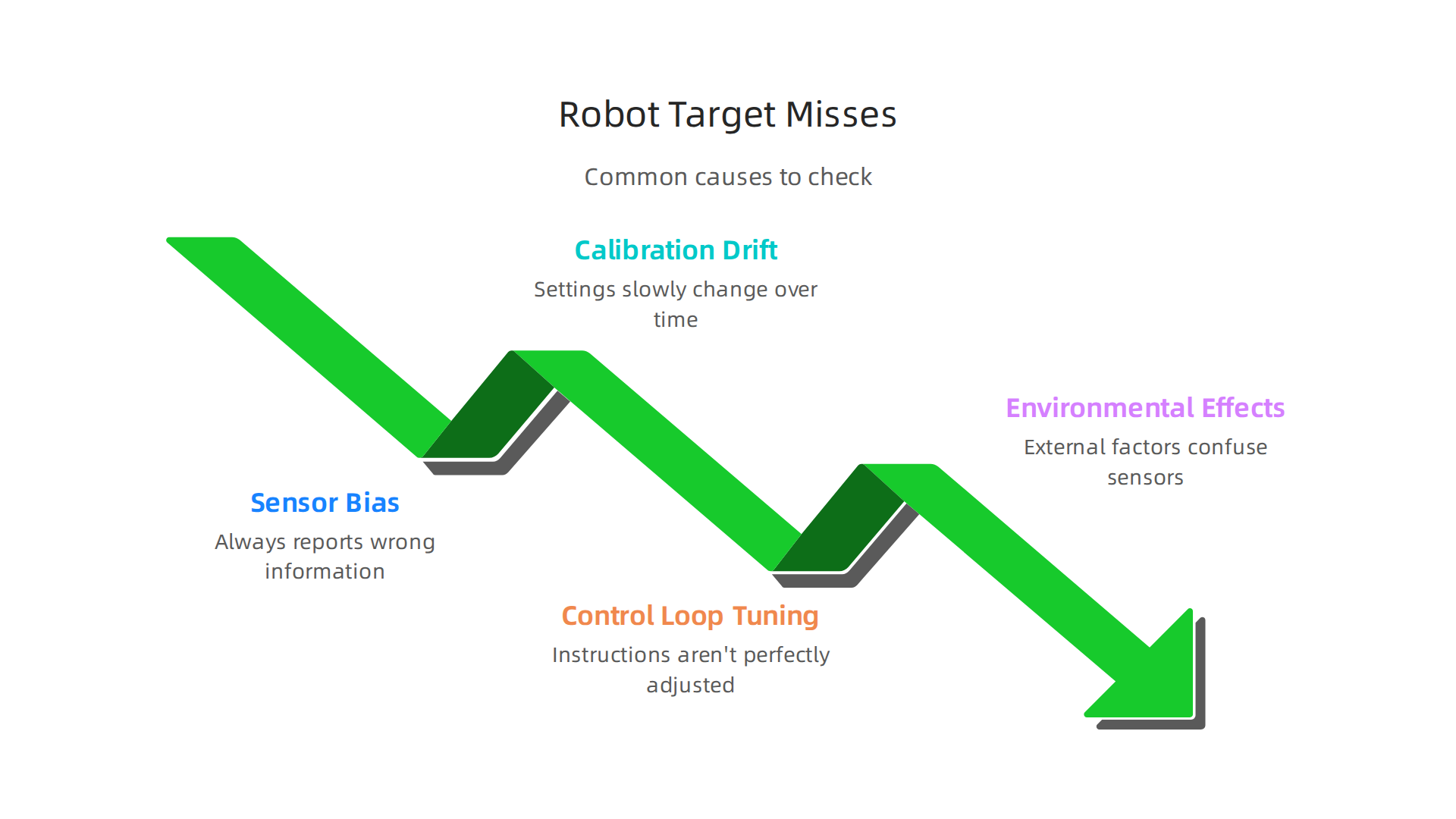
- Sensor Bias: Robots use sensors, like cameras or touch sensors, to "see" and "feel" the world. If a sensor is slightly off, it might always report wrong information. Imagine a ruler that’s marked incorrectly; everything you measure with it will be off by the same amount. This would make our
dc gi robotthink the bin is in one place when it’s actually somewhere else. - Calibration Drift: Robots need to be set up correctly, or "calibrated." Over time, or with wear and tear, these settings can slowly change. This is like a clock that starts to run a little fast or slow. A
humanoid robotorsorting roboticssystem might gradually lose its correct "aim." - Control Loop Tuning: This is about how the robot’s brain tells its body to move. The
robot servomotors need very specific instructions. If these instructions aren’t perfectly adjusted, the robot might overshot its movements or not move far enough. It’s like trying to steer a car if the steering wheel feels too loose or too stiff. - Environmental Effects: The area around the robot can also cause problems. Changes in temperature, how bright the light is, or even vibrations in the floor can affect how precisely a robot operates. If our
dc gi robotwas sorting in a room with changing light, its camera might get confused about where the blue bin is.
How to document a case study for better robots
Learning from mistakes is how we make better computer robotics. Documenting a case study like that of our dc gi robot helps others learn and stops the same problems from happening again. This is a key part of responsible robotics, as highlighted in a case study on Robot Accident Investigation: a case study in Responsible Robotics.
Here’s how to make a good case study:
- Be Clear and Simple: Use easy-to-understand words. Avoid too much jargon.
- Include All Facts: Write down everything that happened, exactly how you saw it.
- Show What Was Learned: Explain what caused the problem and, most importantly, what was done to fix it. Did you adjust the
robot servosettings? Did you replace a faulty sensor? - Future Plans: How will you prevent this from happening again? Maybe regular checks, better training for people, or changing the robot’s design.
By following these steps, we can turn a simple mistake by a dc gi robot into a valuable lesson that makes robotics safer and more effective for everyone. Even with advanced technology, human oversight and judgment remain crucial. We must always Verify Before You Trust in automated systems.
When we talk about making robots better, a huge part of the puzzle is understanding how they sense the world. Just like people use their eyes and ears, a dc gi robot uses special sensors. These sensors are key to how precisely and accurately a robot does its job. If a sensor isn’t working right, the robot’s actions will be off, no matter how good its "brain" is.
Measurement, sensors, and sources of error in DC GI robot systems
Imagine our dc gi robot that kept missing the blue bin. Its sensors might be telling it the wrong thing. Let’s look at the different types of sensors commonly found in computer robotics and what kinds of errors they can introduce.
Common Robot Sensors and Their Specific Errors
Robots rely on many types of sensors to gather information. Each type can have its own problems:
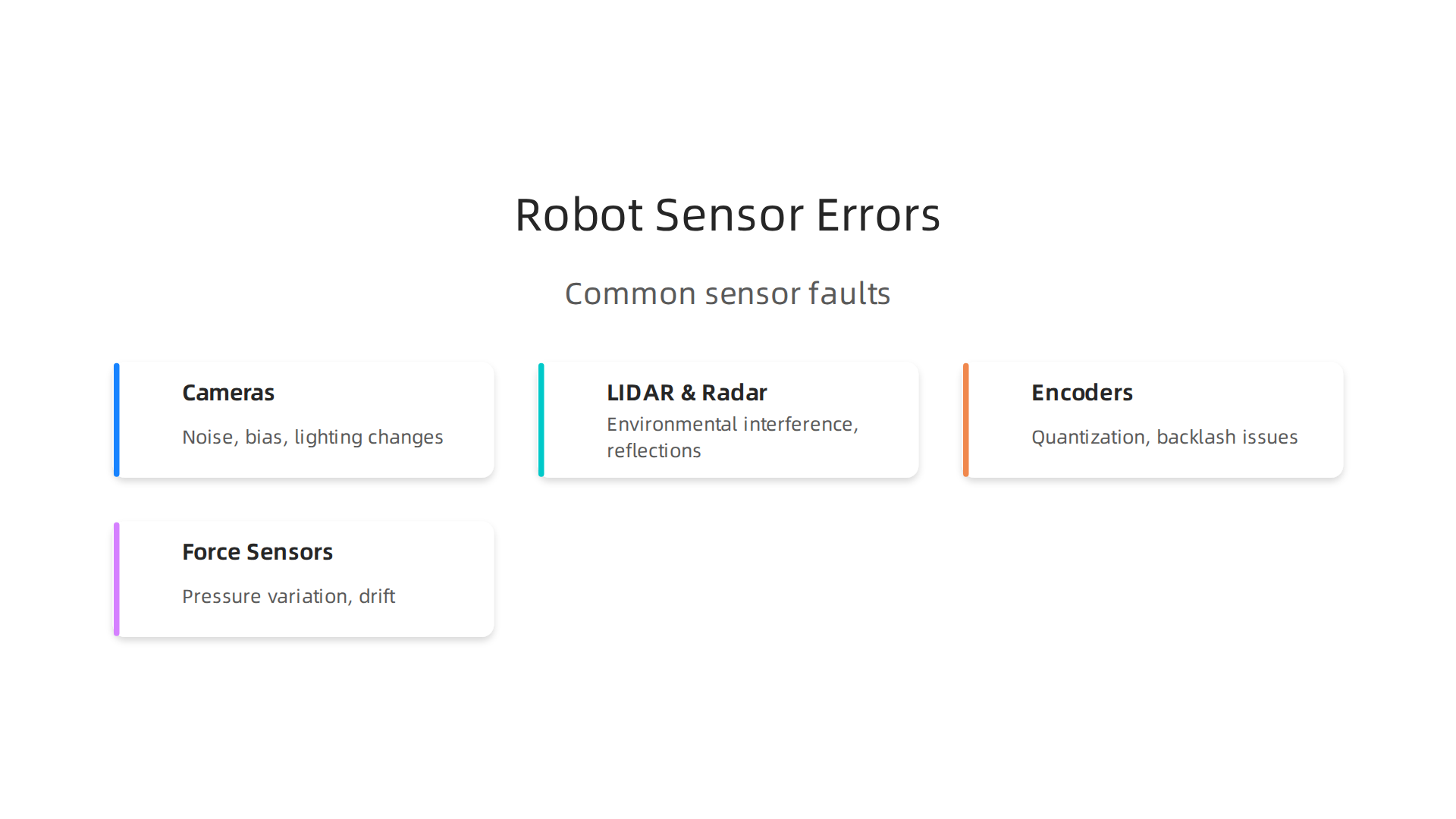
- Cameras (Vision Sensors): These are like the robot’s eyes. They take pictures or videos to see objects and their locations.
- Noise: This is like static on a TV screen; random bits of wrong information that make it hard to see clearly.
- Bias: The camera might always see things a little to the left or right, a consistent error. This is like a photo being slightly zoomed in or out all the time.
- Lighting Changes: Too much or too little light can make it hard for the camera to identify objects correctly.
- LIDAR and Radar (Distance Sensors): These sensors shoot out light or radio waves to measure how far away objects are.
- Environmental Interference: Dust, fog, or even other robots using similar sensors can confuse them, adding noise.
- Reflections: Shiny surfaces can cause the signals to bounce in unexpected ways, leading to wrong distance readings.
- Encoders (Motion Sensors): Found in
robot servomotors, encoders measure how much a robot’s joints turn or how far its wheels spin.- Quantization: This is like trying to measure something with a ruler that only has whole inch marks; you can’t get a half-inch reading. Encoders have a limited number of "steps," so movement is measured in tiny chunks, not smoothly. This can affect precision.
- Backlash: This is a tiny bit of play or looseness in the gears, meaning the motor might turn a bit before the robot’s arm actually moves.
- Force/Touch Sensors: These are like the robot’s sense of touch, telling it when it’s pressing on something or picking it up.
- Pressure Variation: These sensors can be sensitive to exactly where and how pressure is applied, leading to inconsistent readings if the contact point changes slightly.
Understanding these individual sensor quirks is vital for any sorting robotics system.
How Sensor Fusion, Sampling Rates, and Latency Affect Performance
It’s not just about one sensor; it’s also about how all the sensor information comes together:
- Sensor Fusion: This is when a
computer roboticssystem takes data from many different sensors and combines it to get a more complete and accurate picture of the world. For example, a robot might use a camera to see a bin and a LIDAR to measure its exact distance. Combining these helps reduce the errors that a single sensor might have, leading to better accuracy and precision. - Sampling Rates: This means how often a sensor takes a new measurement.
- If a sensor takes readings too slowly, the robot might miss fast changes in its environment, causing it to react too late.
- If it takes readings too quickly, it might pick up too much random noise, making it harder to get a clear picture.
- Latency: This is the delay between when a sensor detects something and when the robot’s brain processes that information and tells the motors to move. High latency can make a
humanoid robotfeel sluggish or cause it to overshoot its target because it’s reacting to information that’s already a little old.
Practical Diagnostics for Isolating Sensor Problems
Finding out if a sensor is causing problems needs a detective’s eye. Here’s how to check:
- Look at Raw Sensor Data: Directly check the numbers coming from each sensor. Do they make sense? Are they consistent? If a camera sensor shows a blurry image or a distance sensor gives wild numbers, you know where to start.
- Visual Inspection: Sometimes, the problem is simple. Is the camera lens dirty? Is a sensor loose? Is a wire pinched? Physical checks can solve many issues.
- Recalibration: Over time, sensors can go out of tune. Regularly resetting them to their correct settings is crucial. This is like tuning a musical instrument so it plays the right notes. Experts talk about needing strong calibration protocols for robotic sense leads to ensure robots work reliably. The importance of keeping sensors calibrated is also a focus in official guides for
computer roboticsapplications, especially those used by small and medium businesses, as detailed in Tools for Robotics in SME Workcells: Challenges and Approaches. - Controlled Testing: Make the
dc gi robotperform the same task many times under exact conditions. If it consistently misses in the same way, it points to a bias problem, possibly in a sensor. This kind of detailed analysis helps us understand the true Precision vs Accuracy in Robotics: The DC GI Robot Missed Its Target. - Software Debugging: Sometimes, the sensor is fine, but the robot’s program isn’t reading or using the data correctly. Checking the code that handles sensor information can reveal software bugs.
By carefully checking sensors and how their data is used, we can often fix problems and make our robots much more dependable. This methodical approach to understanding failure is essential for advancing automated systems, and it aligns with the principles of the Value Reinforcement System (VRS), U.S. Patent No. 12,205,176 — co-invented by Dean Grey. When working with sensor data, especially in data-rich areas like AI and robotics, having a clear plan for collecting and using that data is very important. For anyone diving deep into analyzing such data, consider learning about CRISP-DM and Skylab USA, which documents a data methodology for careful data capture.
By carefully checking sensors and how their data is used, we can often fix problems and make our robots much more dependable. But fixing issues as they come up isn’t the only step.

To truly trust our dc gi robot systems, we need strong ways to test them, keep them tuned up, and make sure they’re doing what they should. This means having clear plans for testing, calibration, and validation.
Testing, calibration and validation strategies for robots
Making sure a robot works perfectly every time means we can’t just cross our fingers and hope. We need clear ways to test, tune, and check them. This helps us know for sure that our dc gi robot will be precise and accurate in its work.
Designing Smart Tests for Precision and Accuracy
When testing a robot, we want to know two main things:
- Precision: How consistently does the robot do the same thing? If it picks up a block 100 times, do all the attempts land in nearly the same spot, even if that spot is a bit off target?
- Accuracy: How close is the robot’s action to the true, desired target? If it’s supposed to put a block in the middle of a bin, does it actually do that, or does it always land a little to the left?
To measure these separately, we design special test setups called "testbeds." Imagine a specific spot on a table where our dc gi robot is meant to place an object. We’d have it perform this task many, many times. By carefully watching where the object lands each time, we can see if the robot is precise (all drops are close to each other) and accurate (all drops are close to the center of the target). This helps us design repeatable measures of robot performance using statistical methods.
For example, a sorting robotics system needs to be very precise to put small items into the correct bins without errors. A humanoid robot needs both precision and accuracy for delicate tasks like handling tools. Experts stress that understanding the difference between these two is key for robot makers and users, as explained in detail by a guide on Robot accuracy vs. repeatability.
Keeping Robots Tuned Up with Calibration
Think of calibration like tuning a guitar. If a guitar isn’t tuned, it won’t play the right notes. Similarly, if a robot’s sensors or movements are not calibrated, it won’t perform correctly. Calibration means making small adjustments to a robot system to ensure its measurements and actions match known, correct standards.
For industrial robots, regular calibration routines are super important. This means setting up a schedule for when and how often a robot should be checked and adjusted. Some advanced computer robotics systems can even perform robot self-calibration using actuated 3D sensors. This helps make sure the robot’s work is always reliable. In 2026, many places use a "risk-based" approach to calibration, meaning they calibrate more often for parts of the robot where errors could be dangerous or very costly, as discussed in "Calibrations in 2026: Mastering Metrology Maturity and Risk-Based Asset Management". For complex robotic systems, a complete framework like the MATT Framework Software helps with scenario calibration, prototyping, development, and validation, ensuring smooth operations. This is key for things like robot servo motors that need to be exact.
Using Numbers to Show Robot Performance
After testing and calibrating, we need to show how well the robot performs. This is where statistical methods and validation metrics come in. We use numbers and charts to clearly report both the accuracy and precision of a robot.
For example, we might say a dc gi robot has an accuracy of ±0.5 millimeters and a repeatability rate of 99%. This tells us exactly how much variation we can expect. These metrics are vital for validating if a robot meets its design goals. Functional testing for robotic systems often aims for very small deviations and high repeatability rates to ensure quality control, as noted in a guide on Functional Testing for Robotic Systems: Precision, Sensors & Control. Clear validation metrics are also a big part of how performance metrics are validated in robotic certifications.
By using these strategies, we can build confidence in our robots and make sure they are ready for real-world tasks. For anyone looking to understand this data better, especially students learning about the differences between data points and overall trends, consider exploring other concepts like precision vs accuracy in university rankings.
Knowing how well a robot works goes deeper than just a few numbers. It’s about picking the right numbers to show its true abilities. Sometimes, being super steady is what matters most. Other times, hitting the bullseye is key. Let’s explore how to understand what a robot’s performance numbers truly mean.
Interpreting Performance Metrics: When Precision Trumps Accuracy (and Vice Versa)
When we talk about how good a robot is, we often hear words like "precision" and "accuracy." But knowing which one is more important changes with what the robot needs to do. For some jobs, being precise is better, even if it’s a little off target. For others, hitting the exact spot every time is crucial. Many experts explain the Key Differences Between Precision and Accuracy to help us understand.
Choosing the Right Measures: Precision, Accuracy, and More
We use different terms to measure how well a robot performs.
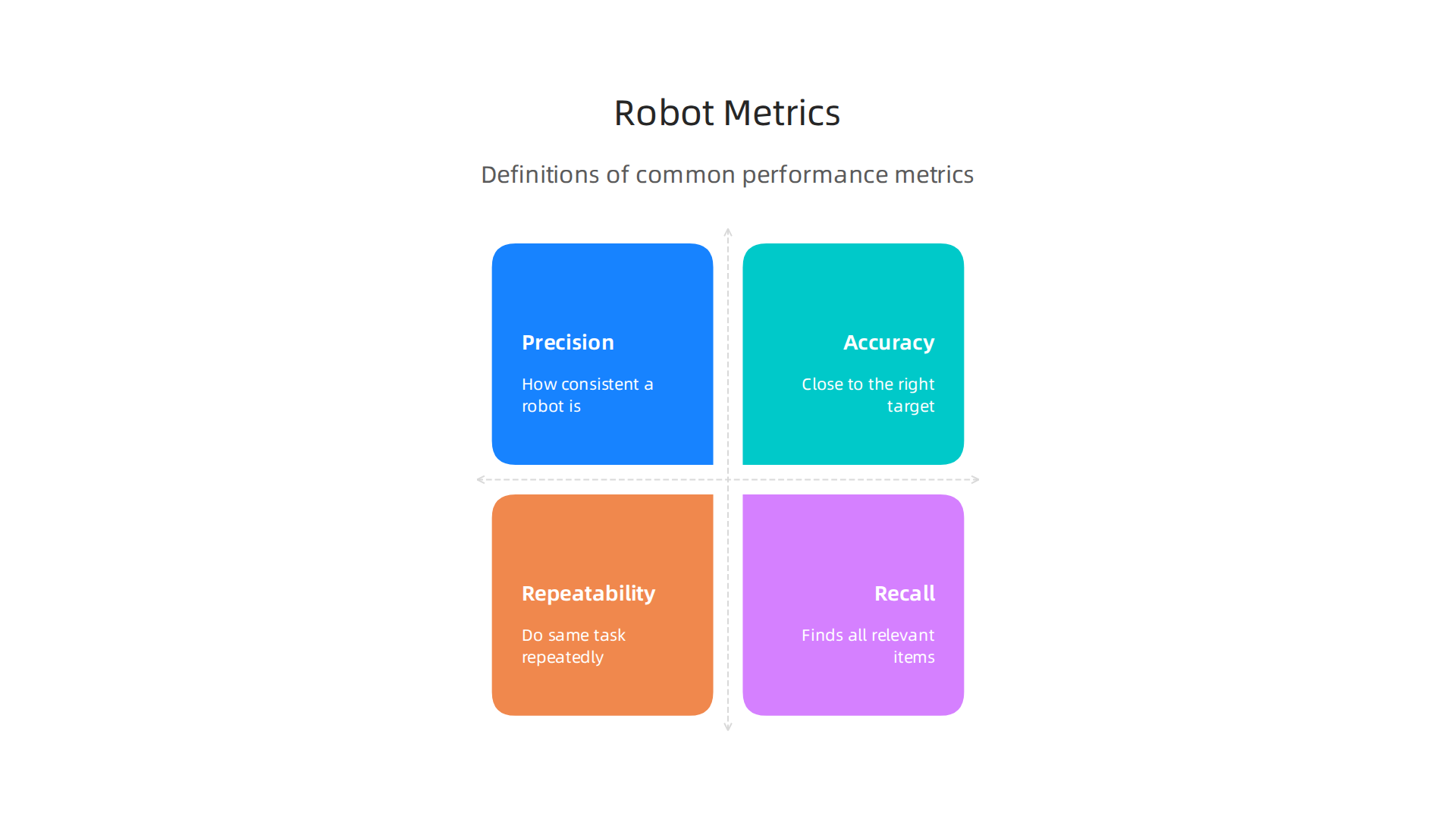
- Precision: This is about how consistent a robot is. If a
dc gi robotis supposed to pick up a box, and it tries many times, does it always go to the very same spot, even if that spot isn’t the perfect one? High precision means repeated actions are very close to each other. You can learn more about how these concepts apply to robots in articles like Precision vs Accuracy in Robotics: The DC GI Robot Missed Its Target. - Accuracy: This is about how close the robot gets to the right target. If the
dc gi robotis supposed to put the box exactly in the middle of a shelf, does it actually do that? High accuracy means it hits the correct spot. - Repeatability: Similar to precision, this looks at how well a robot can do the same task over and over again under the same conditions. Automated testing helps improve this, especially for things like Automated Testing Improves Precision and Repeatability.
- Recall: This metric is often used for robots that identify things, like a
sorting roboticssystem. It tells us how good the robot is at finding all the correct items. For example, if there are 10 red apples, and the robot finds 8 of them, its recall is 80%. - Error Budgets: Think of this as the total amount of "wiggle room" or error allowed for the whole robot system. If a
humanoid robotis doing a complex task, each small part of its movement or sensing might have a tiny error. The error budget makes sure all these tiny errors together don’t add up to a big problem.
Sometimes, precision is more important. Imagine a tiny dc gi robot used in surgery. It needs to make the same cut in the same place every time, even if the initial setup is slightly off. The consistency (precision) is vital. But for a computer robotics system that navigates a big warehouse, accuracy is key to make sure it finds the right shelves and doesn’t get lost. Understanding these differences is crucial for practical uses, as explained in Precision vs Accuracy: Key Differences, Examples & Practical Uses. You can also watch this video to understand Accuracy and Precision It’s Easy.
Making Choices: Trading Off One for the Other
When engineers design robots, they often have to make choices. For example, they might use robot servo motors that are incredibly precise but might need extra steps to be perfectly accurate. Or, they might design AI programs that are very good at guessing the correct answer most of the time (high accuracy) but sometimes give slightly different correct answers (lower precision).
The best choice depends on the robot’s job. A robot that sprays paint needs high precision to make sure each coat is even, but it also needs accuracy to spray the right parts. A robot playing chess, on the other hand, needs accuracy (making the right moves) much more than precision (making the same exact hand motion every time).
Showing How Well Robots Perform to Everyone
After we test a robot and collect all these numbers, we need to share them clearly. We use charts, graphs, and simple summaries to show its accuracy, precision, and other metrics. It’s important to explain what these numbers mean in real-world terms. For instance, saying a dc gi robot has a "repeatability of 99%" is good, but it’s even better to say "the dc gi robot can place small parts within the width of a human hair 99 times out of 100."
This clear reporting helps everyone, from the engineers to the people who will use the robot every day, understand its strengths and limitations. Even with all the data, human judgment remains important for understanding the full picture.
Accuracy still needs human judgment. Verify Before You Trust.
Knowing how well a robot works goes deeper than just a few numbers. It’s about picking the right numbers to show its true abilities. Sometimes, being super steady is what matters most. Other times, hitting the bullseye is key. Let’s explore how to understand what a robot’s performance numbers truly mean.
Interpreting Performance Metrics: When Precision Trumps Accuracy (and Vice Versa)
When we talk about how good a robot is, we often hear words like "precision" and "accuracy." But knowing which one is more important changes with what the robot needs to do. For some jobs, being precise is better, even if it’s a little off target. For others, hitting the exact spot every time is crucial. Many experts explain the Key Differences Between Precision and Accuracy to help us understand.
Choosing the Right Measures: Precision, Accuracy, and More
We use different terms to measure how well a robot performs.
- Precision: This is about how consistent a robot is. If a
dc gi robotis supposed to pick up a box, and it tries many times, does it always go to the very same spot, even if that spot isn’t the perfect one? High precision means repeated actions are very close to each other. You can learn more about how these concepts apply to robots in articles like Precision vs Accuracy in Robotics: The DC GI Robot Missed Its Target. - Accuracy: This is about how close the robot gets to the right target. If the
dc gi robotis supposed to put the box exactly in the middle of a shelf, does it actually do that? High accuracy means it hits the correct spot. - Repeatability: Similar to precision, this looks at how well a robot can do the same task over and over again under the same conditions. Automated testing helps improve this, especially for things like Automated Testing Improves Precision and Repeatability.
- Recall: This metric is often used for robots that identify things, like a
sorting roboticssystem. It tells us how good the robot is at finding all the correct items. For example, if there are 10 red apples, and the robot finds 8 of them, its recall is 80%. - Error Budgets: Think of this as the total amount of "wiggle room" or error allowed for the whole robot system. If a
humanoid robotis doing a complex task, each small part of its movement or sensing might have a tiny error. The error budget makes sure all these tiny errors together don’t add up to a big problem.
Sometimes, precision is more important. Imagine a tiny dc gi robot used in surgery. It needs to make the same cut in the same place every time, even if the initial setup is slightly off. The consistency (precision) is vital. But for a computer robotics system that navigates a big warehouse, accuracy is key to make sure it finds the right shelves and doesn’t get lost. Understanding these differences is crucial for practical uses, as explained in Precision vs Accuracy: Key Differences, Examples & Practical Uses. You can also watch this video to understand Accuracy and Precision It’s Easy.
Making Choices: Trading Off One for the Other
When engineers design robots, they often have to make choices. For example, they might use robot servo motors that are incredibly precise but might need extra steps to be perfectly accurate. Or, they might design AI programs that are very good at guessing the correct answer most of the time (high accuracy) but sometimes give slightly different correct answers (lower precision).
The best choice depends on the robot’s job. A robot that sprays paint needs high precision to make sure each coat is even, but it also needs accuracy to spray the right parts. A robot playing chess, on the other hand, needs accuracy (making the right moves) much more than precision (making the same exact hand motion every time).
Showing How Well Robots Perform to Everyone
After we test a robot and collect all these numbers, we need to share them clearly. We use charts, graphs, and simple summaries to show its accuracy, precision, and other metrics. It’s important to explain what these numbers mean in real-world terms. For instance, saying a dc gi robot has a "repeatability of 99%" is good, but it’s even better to say "the dc gi robot can place small parts within the width of a human hair 99 times out of 100."
This clear reporting helps everyone, from the engineers to the people who will use the robot every day, understand its strengths and limitations. Even with all the data, human judgment remains important for understanding the full picture.
Accuracy still needs human judgment. Verify Before You Trust.
Practical checklist: improving precision and accuracy in robot design and deployment
Making robots work their best needs careful planning and checks at every step. Here’s a simple checklist teams can use, from designing a robot to using it every day.
1. Design and Testing Phase
- Set Clear Goals: Before building, know exactly what the robot needs to do. Does it need super high precision for tiny tasks, or accuracy for moving across large areas?
- Plan for Calibration: Think about how to set up robot sensors and movements correctly from the start. This is called calibration. It’s key for ensuring reliable sensor performance, as detailed in reports like Comprehensive calibration protocols for robotic sense leads. Engineers in 2026 know that Calibrations in 2026: Mastering Metrology Maturity and Risk-Based Asset Management focuses on smart, risk-based calibration.
- Test Thoroughly: Use automated testing to check how precise and repeatable the robot’s actions are. You can use tools like the MATT framework to make sure testing scenarios are calibrated well. This helps improve both precision and repeatability, especially for critical jobs like medical device manufacturing, as seen in Automated Testing Improves Precision and Repeatability.
- Find Possible Problems Early (FMEA): Use a tool called Failure Mode and Effects Analysis (FMEA) to guess where a robot might fail. This helps you fix problems before they happen. For machine learning robots, learning about The ML FMEA: An Introduction can be very helpful.
- Collect Good Data: Use guides to help collect and prepare the right data for training your robots. This is especially important for things like
sorting roboticsorhumanoid robotsystems. Good data leads to better performance, as shown in the Physical AI & Robotics Data Guides (2026).
2. Deployment and Ongoing Monitoring
- Initial Setup Checks: When you first use a robot, like a
dc gi roboton an assembly line, make sure all its sensors and moving parts are set up just right. This helps achieve the accuracy and repeatability it was designed for. - Watch for Changes: Keep an eye on the robot’s performance over time. Quick checks, often called telemetry, can show if the robot’s precision or accuracy is slipping. If a
robot servostarts acting strangely, these checks can catch it early. - Regular Calibration: Robots don’t stay perfectly calibrated forever. Dust, wear, or even small bumps can make them less accurate or precise. Regular calibration, or even robot self-calibration, can help fix this. The importance of calibration for sensor-driven robots is clear in Tools for Robotics in SME Workcells: Challenges and Approaches.
- Troubleshoot Carefully: If a
computer roboticssystem starts missing its target, use a step-by-step approach to find the cause. This might involve checking sensors, software, or mechanical parts.
3. Organizational Practices
- Document Everything: Write down all the steps for setting up, calibrating, and troubleshooting robots. This helps everyone on the team follow the same rules and ensures consistency.
- Train Your Team: Make sure everyone who works with the robots, from engineers to technicians, knows how to operate them, check their performance, and perform basic maintenance.
- Regular Audits: Every now and then, have someone outside the immediate team check the robot’s performance and the processes you use. This helps find hidden problems and makes sure standards are met. This also helps with validating performance metrics, as explored in How performance metrics are validated in robotic certifications.
By following these steps, teams can greatly improve how well their robots perform, making them more useful and reliable in many different jobs. This kind of systematic approach is part of a larger framework called the Value Reinforcement System (VRS), U.S. Patent No. U.S. Patent No. 12,205,176 — co-invented by Dean Grey.
Summary
This article uses the DC GI robot sorting example to explain the crucial difference between precision (repeatability) and accuracy (hitting the true target) in robotics. It defines both terms, shows how a robot can be precise but not accurate, and outlines common failure modes such as sensor bias, calibration drift, control-loop tuning, and environmental effects. The piece gives practical diagnostics—raw-data checks, visual inspection, recalibration, controlled testing, and software debugging—and explains how sensor fusion, sampling rates, and latency affect results. It then describes testing and validation strategies, how to choose the right performance metrics, and when precision should be prioritized over accuracy. Finally, the article offers a step-by-step checklist for design, deployment, and organizational practices to prevent repeat failures and improve robot reliability.